
Download ABC Amber PDF Converter – PDF converter, convert PDF to Word, convert PDF to HTML, convert PDF to TXT, convert PDF to XML, convert PDF to image, convert PDF to audio
Overview
ABC Amber PDF Converter is a specialized utility designed for users who need to transform PDF documents into multiple file formats without relying on Adobe Acrobat. With support for over 30 file types, including DOC, TXT, HTML, XML, and image formats, it serves as a versatile tool for document management and content repurposing. The app is particularly useful for professionals, students, and content creators who frequently handle PDFs and require flexibility in editing, sharing, or archiving content.
Its ability to convert either full documents or specific pages adds a layer of precision, allowing users to extract only the necessary information. The inclusion of text-to-audio conversion further expands its functionality, offering accessibility features for users who benefit from audio playback. Although the developer did not provide additional technical details, the app’s long-standing presence in the market since its release on November 30, 2006, suggests a proven track record in document conversion.
It fills a niche in the productivity ecosystem by offering a standalone solution that bypasses the need for expensive or complex software. Real-world use cases include preparing reports for editing, extracting data from scanned documents, or converting educational materials into accessible formats. For users seeking a reliable, efficient tool to manage PDFs across different workflows, ABC Amber PDF Converter presents a focused and functional option.
Key Features & Functionality
- Multi-Format Conversion: Supports over 30 file formats, including DOC, TXT, HTML, XML, JPEG, PNG, and BMP, enabling users to convert PDFs into the most suitable format for their task. This is ideal for preparing documents for editing, web publishing, or archival purposes.
- Selective Page Conversion: Allows users to convert entire documents or choose specific pages, which is beneficial when only parts of a PDF need to be repurposed, such as extracting a single chapter from a lengthy report.
- Text-to-Audio Conversion: Transforms readable text from PDFs into audio formats like WAV and MP3, supporting multitasking and accessibility needs, especially useful for learners or individuals with visual impairments.
- Acrobat-Free Operation: Displays and processes PDF content without requiring Adobe Acrobat Reader, reducing software dependency and simplifying access to document information.
- Intuitive Workflow: The user-friendly interface streamlines the conversion process, minimizing the learning curve and enabling efficient task completion, even for users with limited technical experience.
For example, a researcher could extract key sections from a PDF journal article and convert them into a Word document for annotation. A teacher might convert a PDF handout into an audio file for students with reading difficulties. A marketer could extract text from a PDF brochure and convert it into HTML for a website update. These real-world applications demonstrate the app’s practical value in diverse professional and academic environments.
Interface, UX & Performance
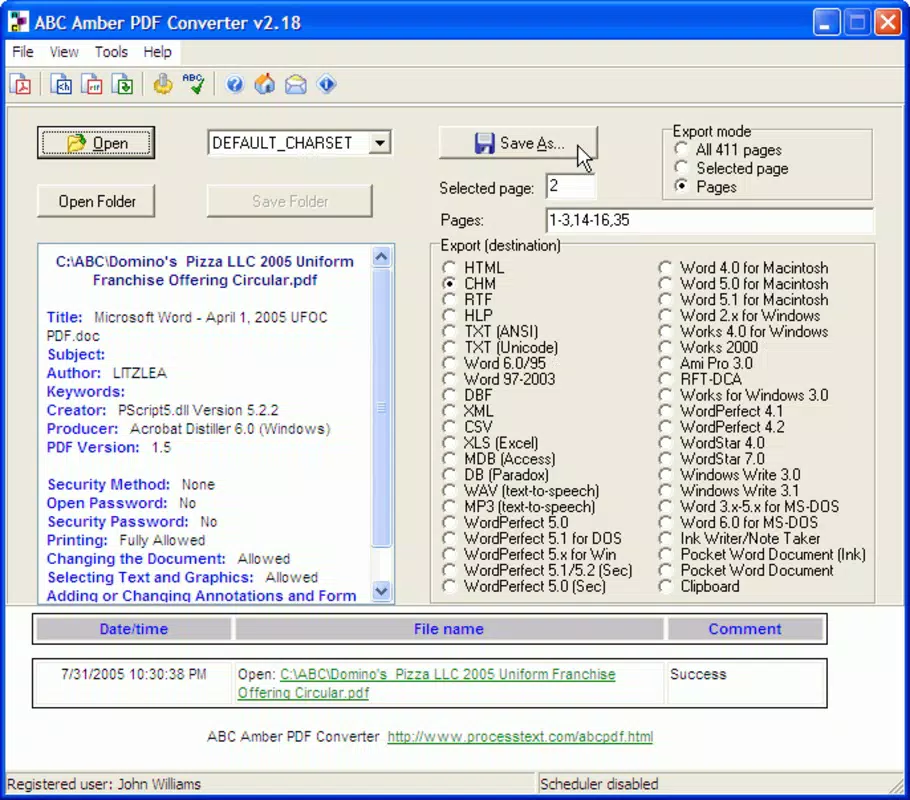
The interface of ABC Amber PDF Converter is designed with simplicity and functionality in mind. It features a clean layout with clearly labeled buttons and a logical flow from file import to format selection and export. Navigation is straightforward, with minimal clutter, allowing users to focus on the conversion task.
The visual style is consistent with traditional desktop utilities—functional rather than flashy—prioritizing usability over aesthetic flair. Users can load a PDF file, choose their desired output format, select pages if needed, and initiate conversion with just a few clicks. Although the developer did not list formal performance metrics, the app’s compact size of 4.7 MB suggests efficient resource usage.
It is expected to run smoothly on standard Windows systems, though specific performance benchmarks were not disclosed. Responsiveness appears to be adequate for typical conversion tasks, with minimal lag during file processing. Stability is implied by the app’s long-standing availability, though no explicit information was provided regarding crash rates or error handling.
Overall, the user experience is optimized for efficiency, making it accessible to both beginners and experienced users who value speed and reliability in document processing.
Platform Compatibility & Technical Requirements
ABC Amber PDF Converter is designed for the Windows operating system. The current version is 3.0, with a file size of 4.7 MB. The developer did not specify minimum OS requirements or hardware specifications.
Compatibility information was not fully disclosed, so users should ensure their system meets general Windows compatibility standards. The app is not available for mobile platforms such as Android or iOS, and no information was provided regarding support for macOS or other operating systems. The price for the software is $49.95, indicating a premium offering rather than a free or freemium model.
The lack of platform-specific details means users must rely on general system compatibility when installing. For those seeking a lightweight, Windows-only solution for PDF conversion, this app may be suitable, though broader cross-platform availability is not confirmed.
Pros and Cons
Pros
- Supports over 30 file formats, enhancing versatility in document conversion.
- Allows selective page conversion for greater precision and efficiency.
- Includes unique text-to-audio conversion for improved accessibility and multitasking.
- Operates without requiring Adobe Acrobat Reader, reducing software dependencies.
- Compact file size of 4.7 MB indicates low system resource usage.
Cons
- Not available for mobile platforms such as Android or iOS.
- Specific system requirements were not listed by the developer.
- Price point of $49.95 may be considered high for casual users.
- No information on automatic updates or version history beyond version 3.0.
- Limited availability of user feedback or support resources.
FAQ
Is ABC Amber PDF Converter safe to download and install?
The app is developed by DataNumen, Inc., a known software provider in the document utilities space. While no third-party verification was provided, the app’s long-standing presence and specific file size suggest it is a legitimate tool. Users should ensure they download from official sources to avoid potential risks.
Can I convert PDFs to audio files using this app?
Yes, ABC Amber PDF Converter includes text-to-audio conversion functionality, allowing users to export text content from PDFs into audio formats such as WAV and MP3.
Is Adobe Acrobat required to use this app?
No, the app is designed to operate independently of Adobe Acrobat Reader. It can display and process PDF content without requiring additional software.
What file formats can I convert a PDF to?
The app supports conversion to over 30 formats, including DOC, TXT, HTML, XML, JPEG, PNG, BMP, WAV, and MP3, among others.
Is the app available for Android or iOS?
Currently, ABC Amber PDF Converter is only available for Windows. There is no official version for mobile platforms such as Android or iOS.
Final Thoughts
ABC Amber PDF Converter stands out as a focused, efficient tool for users who need reliable PDF conversion capabilities without the overhead of Adobe Acrobat. Its support for a wide range of output formats, combined with selective page conversion and text-to-audio functionality, makes it a valuable asset for professionals, educators, and content creators. While the lack of mobile availability and the premium price may deter some users, those working primarily on Windows systems will find the app’s performance and feature set to be well-aligned with productivity needs.
The clean interface and low resource usage further enhance its appeal. For anyone seeking a dependable, no-frills solution to manage and repurpose PDF content, ABC Amber PDF Converter delivers tangible value. Download ABC Amber PDF Converter now.


